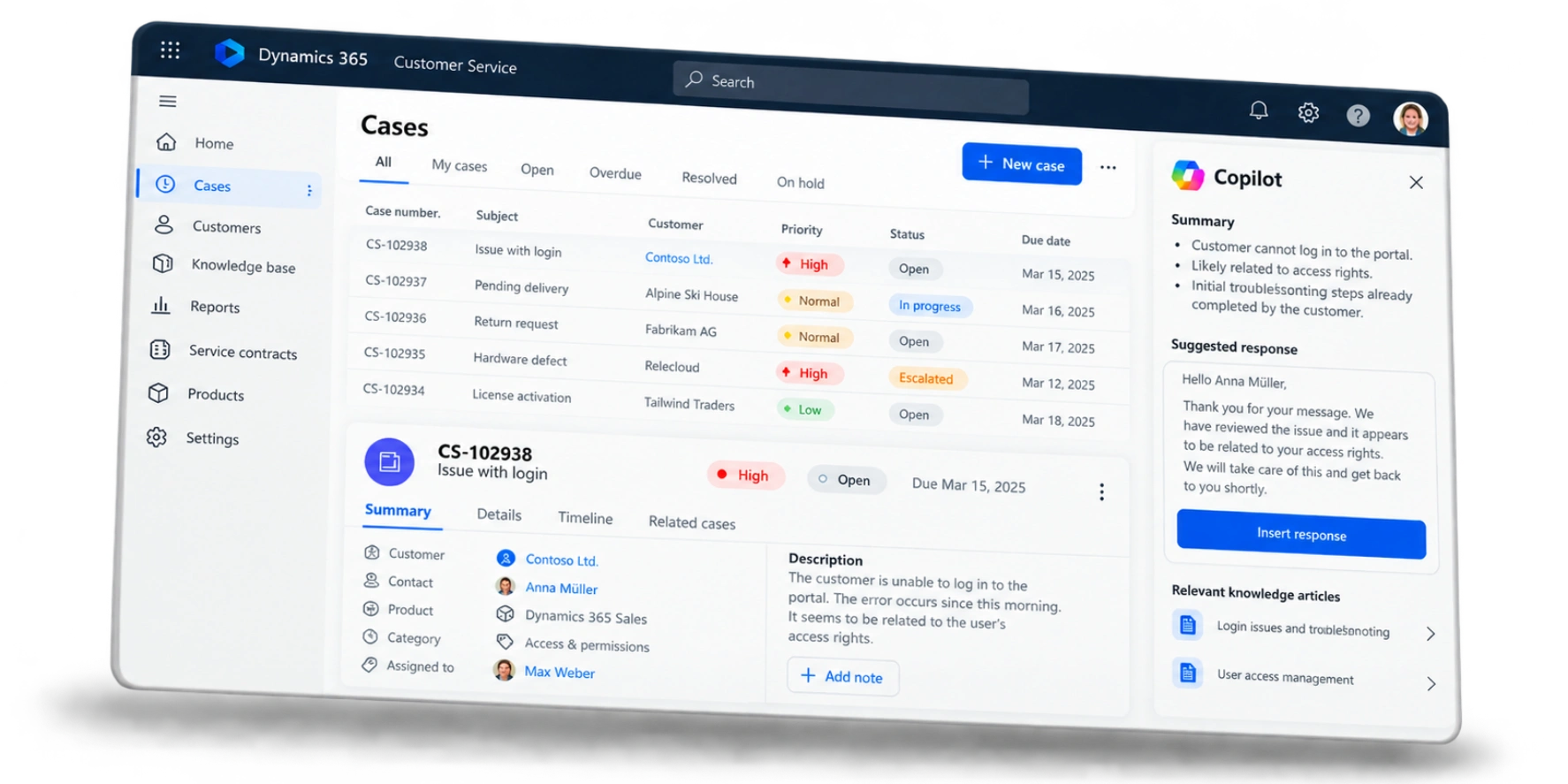
What Dynamics 365 Customer Service does Microsoft Dynamics 365 Customer Service is the service application in Microsoft Dynamics 365. Every enquiry that reaches your service team, whether by email, phone, chat or through a customer portal, becomes a case with a clear owner, a priority and a deadline. The case stays open until the problem is solved, and nothing gets lost in a shared inbox or a spreadsheet along the way.
Service staff see everything they need on one screen: earlier cases, orders, contracts, the products the customer uses and what sales last discussed with them. Microsoft Copilot drafts replies, summarises long email threads and suggests matching articles from your knowledge base, so your team spends less time searching and more time solving.
As a Microsoft Solutions Partner, we have extensive experience and proven expertise in six key areas


Copilot supports service staff directly in the case: it summarises what has happened so far, writes a first draft of the reply, suggests knowledge articles and sums up a chat or call once it ends. New team members can pick up a case without reading through weeks of history first.
On top of that, Microsoft provides AI agents that work in the background. The Case Management Agent creates and updates cases from incoming emails and chats, fills in the details and follows up with customers. The Customer Intent Agent learns from past conversations what customers typically ask about, which improves routing and self-service. The Customer Knowledge Management Agent turns solved cases into draft knowledge articles for your team to review. And the Quality Evaluation Agent checks conversations against the standards you define and shows where coaching would help. The agents are paid for by use rather than per user.
In a Forrester-study from March 2024, commissioned by Microsoft, companies using Dynamics 365 Customer Service cut the average handling time of a request by 40 percent, solved 20 percent more requests on first contact and routed 15 percent fewer requests to the wrong person.
Microsoft offers two products for customer service, and the difference matters when you plan a project. Dynamics 365 Customer Service is about the request itself: cases, deadlines, service contracts, the knowledge base and the customer portal. Dynamics 365 Contact Center is about the conversation channels: phone, live chat, messaging apps, voicebots and the routing of live conversations to available staff.
If most requests reach you by email or through a portal, Customer Service on its own is usually enough. If your team spends a large part of the day on the phone or in live chats, you add Contact Center, or choose Customer Service Premium, which includes both.
Handles cases and follow-up work.
Manages the conversation and the enquiry.
Microsoft Dynamics 365
Customer Service Premium includes both solutions
Bring Customer Service and Contact Center together in one solution to deliver seamless service across all channels.
Who handles which enquiry?
What response times have you agreed with each customer?
When is a case escalated to second-level support?
Emails to your service address, portal submissions and calls turn into cases automatically, with category, priority and the customer already filled in. Service level agreements define how quickly each type of request must be answered and solved; the system warns before a deadline is missed and escalates if needed. Entitlements record how many support hours or cases a customer's contract covers.
Dashboards show open cases, backlog, response times and how well you are keeping to your service level agreements, by team, product or customer. Power BI adds deeper analysis, and the Quality Evaluation Agent checks conversations against your own quality criteria, so team leads know where to step in.
01
02
03
04
Summaries, reply drafts, case updates and knowledge articles are prepared by AI. Your staff check and send, instead of writing everything from scratch.
05
06
07
A shared service inbox works while the volume is small. As requests grow, emails get answered twice or not at all, nobody knows how long customers are waiting and the knowledge of experienced staff leaves with them. Older ticket tools often solve part of the problem, but they don't know anything about orders, contracts or sales.
When you move to Dynamics 365 Customer Service, we carry over open cases, case history and existing knowledge articles. It is also a good moment to set clear response times, agree on categories and decide which requests can be answered by self-service.
If you already use Dynamics 365 Sales or Business Central, Customer Service completes the picture: sales, service and ERP work with the same customer data, from the first quote to the last warranty claim.
A service team that starts with email, a standard case process and few integrations can be working in Dynamics 365 Customer Service within a few weeks. Portals, phone channels, ERP integration and migrating data from an old ticket system add time. Most projects go live in stages, one team or channel at a time.

Let's discuss your service processes, challenges and goals. In a short introductory call, we'll explore how Dynamics 365 Customer Service can support your team and identify the most sensible next step for your business – with no obligation.