Microsoft Dynamics 365

Dynamics 365 Sales

Microsoft Dynamics 365 Sales is the sales solution within Microsoft Dynamics 365. Leads, customers, sales opportunities and quotations are managed centrally – rather than in Excel spreadsheets, personal Outlook folders or standalone solutions.

The solution works with Outlook, Teams, Excel and LinkedIn Sales Navigator together. Emails, appointments, calls and notes are stored directly in the customer record. This means the whole team can keep track of the history relating to customers and sales opportunities. The integrated Microsoft Copilot supports day-to-day sales work.

microsoft-dynamics-365-sales-opportunity-pipeline3
4 hours saved per sales assistant per week*
Microsoft Solutions Partner

Backed by six Microsoft Solutions Partner designations

As a Microsoft Solutions Partner, we have extensive experience and proven expertise in six key areas

Copilot & AI Agents

Copilot and AI agents on the sales team

Sellers no longer have to type everything into the CRM themselves. Microsoft Copilot works in Dynamics 365, in Outlook and in Teams. Before a customer meeting it lists what has happened with the account so far and which opportunities are open. After the call it writes a summary. And it drafts the follow-up email from what is already in the CRM, with a suggestion for what to do next.
Microsoft is also adding AI agents that do work in the background. The Sales Qualification Agent looks up information on new leads and judges how promising they are. The Sales Opportunity Agent keeps an eye on open opportunities and points out risks or steps that were missed. The decisions stay with your sellers; they just spend much less time researching and entering data.

According to a Forrester-Studie aus 2024 , commissioned by Microsoft, sellers using Copilot estimate they save around four hours a week on work like meeting preparation, emails and CRM updates.
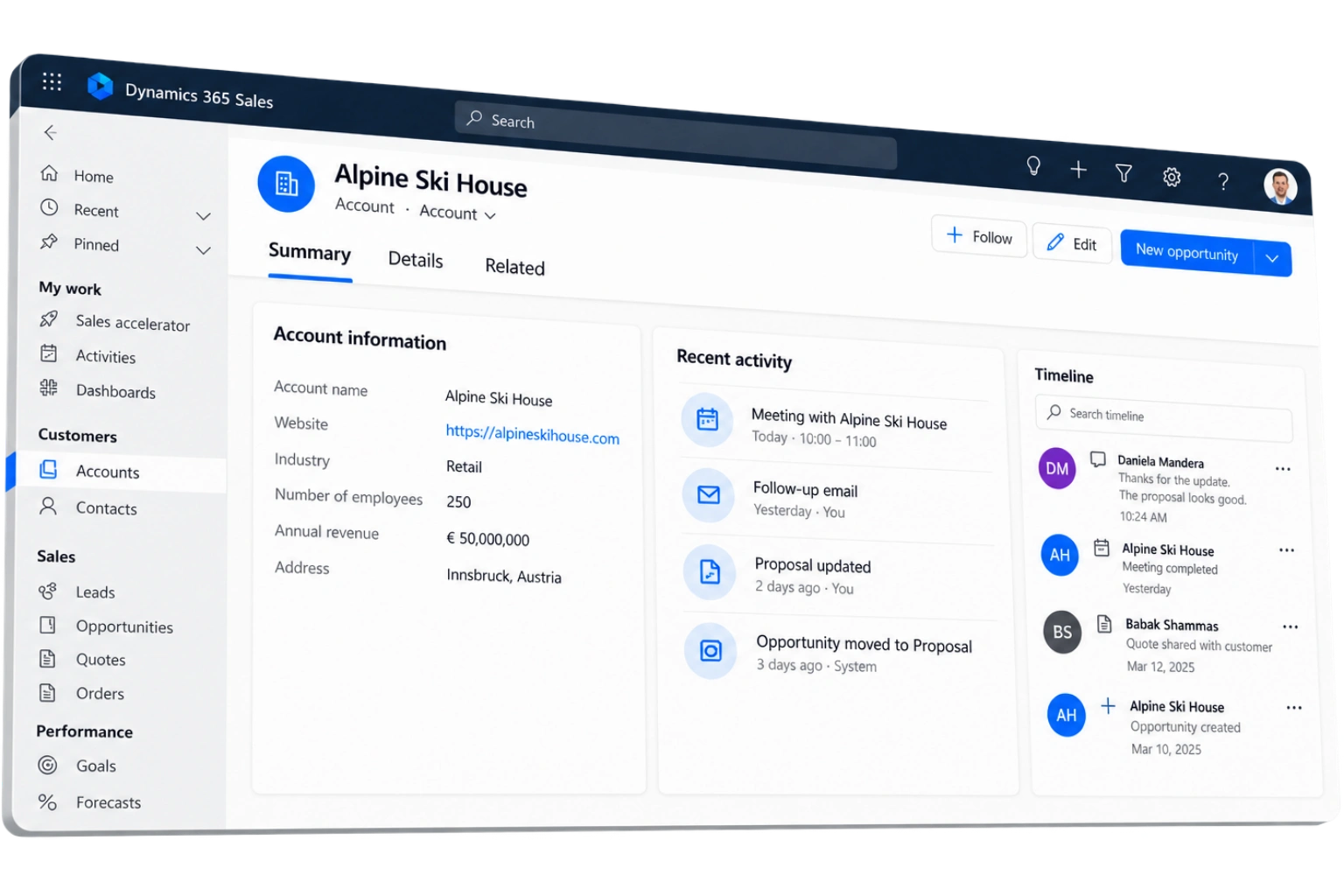
Microsoft Dynamics 365 Sales with a customer overview and integrated Copilot
Sales
Qualification Agent

Identify new leads and assess how promising they are.

Sales
Opportunity Agent

Identifies potential sales opportunities and highlights risks or steps that have been overlooked.

Ready to take your sales team further with Dynamics 365 Sales?

Let’s look at your sales processes, requirements and goals together and determine the right next step.

Start small, grow without switching systems

A sales team of ten can use Dynamics 365 Sales just as well as an international company with several hundred sellers working in different currencies and languages. Microsoft releases new features twice a year and installs them in the cloud, so there are no upgrade projects to plan.
Which edition you start with depends on how you sell. Sales Professional covers the basics. Sales Enterprise adds forecasting and more room for customisation, which B2B companies with longer sales cycles usually need. Sales Premium includes all of Microsoft's AI features for sales. Later on you can add Customer Service, Customer Insights, apps from Microsoft AppSource or your own extensions built with the Power Platform.

Sales Professional

Covers the
basics.

Sales Enterprise

Adds forecasting and more room for customisation.

Sales Premium

AI features for maximum productivity

+
Can be expanded later with
Customer Service
Customer Insights
Apps from Microsoft AppSource
Custom extensions built with the Power Platform
Finding the right CRM together

Implementation starts with your sales process

Setting up a CRM takes a few weeks. Getting sellers to actually rely on it takes longer. That is why collana, as a certified Microsoft Solutions Partner, starts every Dynamics 365 Sales project by looking at how your team sells today, and sets up the system to match. We stay involved after that too: with training and support once the system is live.
01

Understand your sales process

We analyse how your team sells today.
02

Set up Dynamics 365 Sales

We configure the system to match your sales process.

03

Training & Support

We continue to support you after go-live.

Ready to take your sales team further with Dynamics 365 Sales?

Let’s look at your sales processes, requirements and goals together and determine the right next step.

From the first lead to the signed contract

Dynamics 365 Sales supports the entire sales process – from generating new leads and managing sales opportunities through to quotations and orders. This enables everyone involved to work in a structured manner, using up-to-date data and with a clear overview.

Leads & qualification

Leads from your website, trade fairs, webinars or campaigns are automatically fed into Dynamics 365 Sales and routed to the appropriate sales staff. Lead scoring and the Sales Qualification Agent analyse each lead, gather information about the company and previous contacts, and suggest the next steps. This allows your sales team to focus on the most promising prospects, rather than working through long lists.

Opportunity & pipeline management

Each opportunity moves through the same stages, for example qualification, proposal and closing. Required fields make sure the important information is filled in before a deal moves on, so the data looks the same no matter who entered it. Sales managers can see where each deal stands, which ones have stalled and where a seller might need help, without chasing updates by email or merging spreadsheets.

Products, quotes & orders

Products, price lists and discounts are kept in Dynamics 365 Sales. Sellers create a quote straight from the opportunity, send it from Outlook and turn it into an order once the customer accepts. If you use Business Central or Dynamics 365 Finance & Supply Chain, sellers also see prices, stock, credit limits and open invoices in the CRM, and orders go to the ERP without being typed in twice.
Support for day-to-day sales

Additional features for an efficient sales organisation

In addition to the core processes, Dynamics 365 Sales offers powerful features to support your sales team in their day-to-day work. For greater efficiency, better decision-making and sustainable growth.

Copilot in Outlook and Teams

Sellers can keep the CRM up to date without leaving their inbox. In Outlook and Teams, Copilot shows the customer and deal details next to the email or meeting, drafts replies using CRM data, summarises meetings and saves emails, meetings and contacts to Dynamics 365 in a couple of clicks. That way, more of what happens with a customer ends up in the CRM, with less typing.

Sales Accelerator: a daily worklist for sellers

The Sales Accelerator gives each seller a list of the leads and opportunities to work on today, sorted by priority. Sequences set out the follow-up steps, for example a call on day one and an email on day four, and the system suggests what to do next. New team members find their feet faster because the way your best sellers work is written into the system. With LinkedIn Sales Navigator connected, sellers also see who in their network knows the customer.

Forecasting, reporting & sales analytics

Forecasts are calculated from the current pipeline, not from Excel files collected from each seller. Dynamics 365 Sales also estimates which deals are likely to close and which are at risk, so sales managers notice problems earlier and can plan with more confidence. Dashboards and Power BI reports show the pipeline, win rates, activity and sales figures by team, region or product, for a single seller or for all subsidiaries together.
8 reasons to choose Dynamics 365 Sales

Why Dynamics 365 Sales delivers for sales teams

Dynamics 365 Sales brings people, processes and data together – for more efficient sales, better decision-making and sustainable growth. These eight reasons show the tangible benefits you can expect in your day-to-day sales work.

01

One view of every customer

Contacts, companies, emails, meetings, quotes and orders are all on one customer record. Nothing is stuck in someone's inbox or on their laptop. When a seller leaves or a colleague takes over an account, the whole history is there.

02

Selling where your team already works

Dynamics 365 Sales works inside Outlook, Teams, Excel and LinkedIn Sales Navigator. Sellers stay in the programs they know instead of jumping between applications. That means less training and a much better chance that the team actually uses the CRM, which is what decides whether a CRM project works.

03

consistent sales process across the team

Defined stages, required fields and automatic follow-up tasks mean every seller handles a deal in the same way. How good the pipeline data is no longer depends on who entered it, and management can rely on the numbers.

04

Less typing, less searching

Copilot and the sales agents in Dynamics 365 do the research, prepare meetings, write summaries and draft emails. Your sellers get that time back for talking to customers.

05

Reliable forecasts instead of gut feeling

Pipeline and forecasts come from the data in the CRM as it is today. Dynamics 365 Sales flags deals that look at risk and shows trends early, so sales managers can act during the quarter instead of explaining the numbers at the end of it.

06

Room to add what you need

If the standard features are not enough, the Power Platform fills the gap. With Power Apps, Power Automate, Power BI and Copilot Studio you can build your own apps, automations, reports and AI agents on the same data as the CRM, instead of adding separate tools on the side.

07

Four hours a week back for every seller

In a 2024 Forrester study commissioned by Microsoft, sellers using Copilot estimated they save around four hours a week, roughly a tenth of their working time. Forrester expects that time to turn into more deals worked, better win rates and 3.5 to 8.2 percent more revenue.

08

Sales and ERP working from the same data

Dynamics 365 Sales, Business Central and Dynamics 365 Finance & Supply Chain are Microsoft products and are designed to work together. Customer data, prices, stock levels and order histories are shared between sales and ERP as soon as they change. collana’s many years of ERP experience are particularly valuable when integrating the two systems.
References

Sales teams already working with Dynamics 365

Most of these companies started out in a similar situation: customer information spread across inboxes, forecasts put together in spreadsheets and no clear view of the pipeline. Today their sales teams work from the same customer records, follow-ups are set up automatically and management trusts the figures. Here are some of them.

Ready to take your sales team further with Dynamics 365 Sales?

Let’s look at your sales processes, requirements and goals together and determine the right next step.

CRM modernisation

Leave Excel spreadsheets and legacy CRM systems behind

Data migration to Microsoft Dynamics 365 Sales with integration with Business Central and Finance & Supply Chain

Starting point

When data and processes are scattered

Excel spreadsheets, a legacy CRM, an earlier version of Dynamics, or a solution introduced years ago as a temporary fix: many sales teams still work this way. As long as the team is small, this often works. But as the team grows, customer data becomes spread across multiple places, putting together a forecast takes days, and nobody knows exactly which stage each deal is in.

Migration

Step by step to Dynamics 365 Sales

When moving to Dynamics 365 Sales, we migrate your accounts, contacts, open opportunities and activity history step by step. At the same time, it is a good opportunity to clean up duplicates and take another look at your sales process:

Sales and ERP

Get even more value with a Dynamics ERP

If you already use Business Central or Dynamics 365 Finance & Supply Chain, you benefit even more. Sales and ERP use the same customer data. This means a quote becomes an order and then an invoice without information having to be entered again. Your sales team can check credit limits, delivery dates and outstanding invoices without leaving the CRM.
Quote
Order
Invoice
Dynamics 365 Sales Business Central / Finance & Supply Chain
Why collana

How collana brings Dynamics 365 Sales into your business

Whether a CRM project has been successful becomes clear six months after go-live – in how your sales team actually uses the system. collana knows Microsoft products and the day-to-day reality of many sales teams. We bring both to every Dynamics 365 Sales project.

More than a CRM team

collana is a Microsoft Solutions Partner in six areas: Business Applications, Data & AI, Digital & App Innovation, Infrastructure, Security and Modern Work. For your sales project, that means CRM, ERP integration, Power Platform, reporting and security are all handled by the same team.

6

Microsoft Solutions Partner designations

We start with your
sales process

A manufacturer selling in projects, a wholesaler managing key accounts and a company in a regulated industry with several approval steps all sell differently. We know these setups from our customer projects and know where the standard needs adjusting. That experience shapes every Dynamics 365 Sales project from the very first workshop.

Built to be used every day

A CRM only pays off if it is used every day. That’s why we train your team, support the new way of working and continue developing the system after go-live. More than 1,000 customers in Germany, Switzerland and other European countries work with collana.

1000+

Customers in Germany, Switzerland and other European countries.

FAQ

Dynamics 365 Sales: common questions

What is Microsoft Dynamics 365 Sales used for?

Dynamics 365 Sales is Microsoft's CRM for sales teams. You use it to manage leads, companies, contacts, opportunities, quotes and sales activities in one system. Deals go through the stages you define, emails and meetings are saved from Outlook, and the pipeline and forecasts are calculated from the current data in the CRM. Copilot and the AI agents help sellers with research, summaries and email drafts.

What is the difference between Dynamics 365 Sales and Dynamics 365 CRM?

Dynamics 365 CRM" is the collective name for Microsoft's customer applications: Sales, Customer Service, Customer Insights (for marketing) and Field Service. Dynamics 365 Sales is the one made for the sales team. Many companies start with Sales and add the others later; they all share the same data.

What does Microsoft Dynamics 365 Sales cost?

You pay a monthly fee per user. There are three main editions: Sales Professional for the basics, Sales Enterprise for B2B sales with forecasting and more customisation, and Sales Premium with additional AI features. Microsoft Relationship Sales combines Sales Enterprise with LinkedIn Sales Navigator, and Team Members licences are a cheaper option for people who only use the system occasionally. On top of the licences come implementation, customisation and support, which depend on the size of the project. We can give you a realistic figure once we know your requirements and how many users you have.

Which AI features does Dynamics 365 Sales offer?

Copilot works in Dynamics 365 Sales, Outlook and Teams. It summarises accounts, opportunities and meetings, drafts emails using CRM data and suggests next steps. Microsoft also offers AI agents, such as the Sales Qualification Agent, which researches and rates leads, and the Sales Opportunity Agent, which follows open opportunities and points out risks. Which features you get depends on your licence, country and language.

How long does a Dynamics 365 Sales implementation take?

If you start with a standard sales process and only a few connections to other systems, your team can be working in Dynamics 365 Sales within a few weeks. Custom requirements, moving data from an old system, connecting the ERP or rolling out in several countries all add time. What saves the most time is being clear before we start: how your sales process works and what the system needs to do.

Can Dynamics 365 Sales be connected to our ERP system?

Yes. Dynamics 365 Sales has ready-made connections to Business Central and Dynamics 365 Finance & Supply Chain, and can be connected to other ERP systems through its APIs and Power Platform connectors. Usually Dynamics 365 Sales looks after customers and opportunities, while the ERP handles orders, deliveries and invoices. Where the ready-made connectors are not enough, collana builds the connection for you.

What is the difference between Dynamics 365 Sales and Salesforce?

Salesforce has a large app marketplace, but licences, implementation and running costs are often higher and more complicated. Dynamics 365 Sales comes from Microsoft, so Outlook, Teams, Excel, Power BI and LinkedIn work with it from the start, without paying for extra connectors. If your company already uses Microsoft 365 or a Dynamics 365 ERP, Dynamics 365 Sales is usually the simpler and cheaper choice.

Ready to take the next step with Dynamics 365 Sales?

Let’s talk about your sales processes, requirements and goals. In a short first conversation, we’ll show you the most sensible next step for your business — with no obligation.